
1.3. Sales Order Advanced
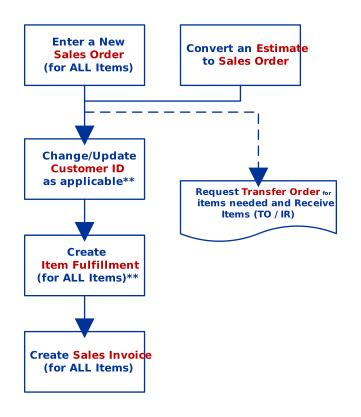
The general Sales Order flowchart might be insufficient to accommodate some cases. Please be guided by the following process flows depending on the scenario you are in. For scenarios not mentioned, please consult your Branch Supervisor or NetSuite Administrator for advice.
Scenario 1: Order needs an Invoice immediately although items are physically incomplete. (for Government or any applicable transaction).
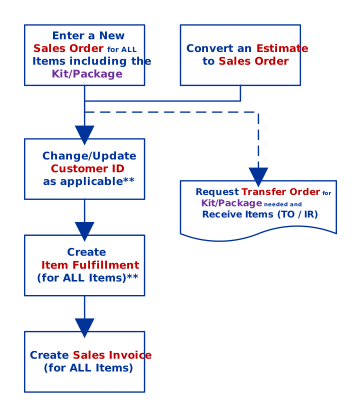
Scenario 2: Order includes a Kit/Package which is insufficient/not available on the serving Branch and will be taken from other location.
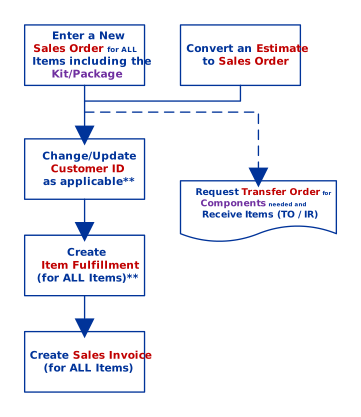
Scenario 3: Order containing a Kit/Package had insufficient/not available Component(s) on the serving Branch and will be taken from other location.
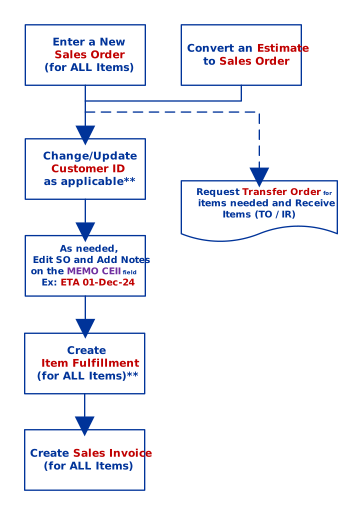
Scenario 4: Order contains a BackOrdered item which will stall for longer period due to shipment ETA.
- Note: This will ensure that an Open/Pending SO is valid and does not need to trigger a follow-up regularly.
Scenario 5: Sample Flow of a Partial Fulfillment.
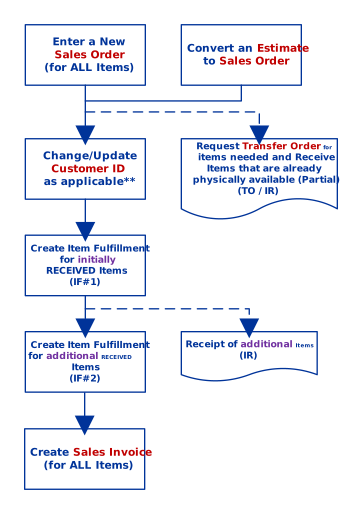
**Important**
- Change/Update the Customer ID during Estimate/Sales Order if applicable before converting into Sales Invoice. Failure to update will detach related transactions and will keep the Sales Order in “Open” status.
- Creating Item Fulfillment will lead to Negative Inventory for unavailable items. Negative inventories will zero-out (correct the balance) only once all Transfer Orders & Item Receipts are completed.